Over the last few months, while working on technical support for Eidolon home AI, we repeatedly encountered a situation that initially seemed completely absurd:
AMD GPUs with 16 GB of VRAM running into “Out of VRAM” errors in scenarios where NVIDIA cards with less memory completed the same task successfully.
At first glance, this makes no sense.
If a GPU has more available memory, why would it fail?
The answer is that, in local AI workloads, total VRAM capacity is only part of the story. In many cases, it is not even the most important part.
The Myth of “Free VRAM”
Many users check their GPU monitor and see something like: VRAM used: 2 GB out of 16 GB
Out of VRAMThe natural reaction is: “Impossible. I still have 14 GB free.”
In reality, the issue is not the total amount of available memory, but how that memory is allocated.
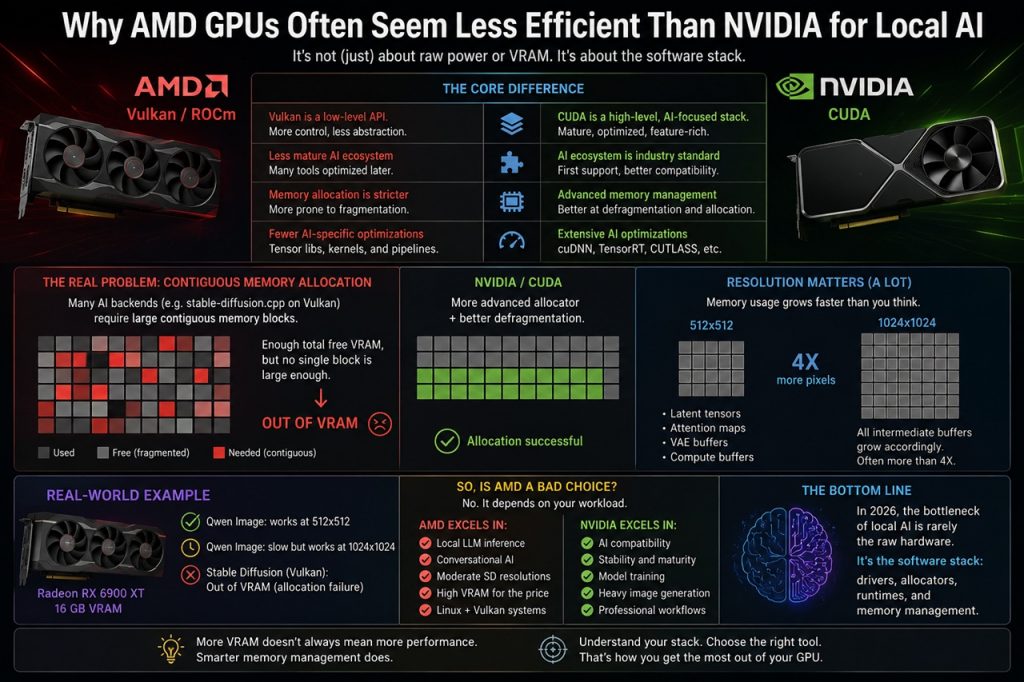
The Real Problem: Contiguous Memory Allocation
Many AI backends, including Vulkan-based projects such as stable-diffusion.cpp, require large contiguous memory blocks.
This means the driver must find a sufficiently large continuous region of VRAM for compute buffers.
Even if the total free VRAM appears high, memory may already be:
- fragmented,
- split into smaller blocks,
- occupied by temporary allocations or cache,
- unavailable as one large contiguous chunk.
As a result, the GPU may technically have plenty of free memory while still failing to allocate the buffer required by the AI workload.
Why NVIDIA Usually Suffers Less From This
The short answer is: CUDA.
NVIDIA has been investing heavily in AI infrastructure for over a decade.
CUDA today is not just a compute framework. It is a highly mature software ecosystem specifically optimized for machine learning and AI inference.
This includes:
- advanced memory managers,
- mature allocators,
- better fragmentation handling,
- tensor-specific optimizations,
- highly optimized AI libraries.
In practice, CUDA is often able to manage complex memory allocations far more efficiently than Vulkan-based backends currently used on many AMD GPUs.
AMD Is Not “Slower.” The Real Difference Is the Software Stack
This distinction is extremely important.
Modern AMD GPUs:
- offer excellent raw compute power,
- often provide more VRAM at the same price point,
- perform very well in gaming,
- can be excellent for local LLM inference,
- have improved dramatically under Linux.
The main issue today is ecosystem maturity in consumer AI.
Most AI frameworks:
- are developed first for CUDA,
- optimized primarily for NVIDIA hardware,
- and only later adapted for Vulkan or ROCm.
This often leads to:
- less efficient memory allocation,
- more fragile backends,
- additional compatibility issues,
- model-specific workarounds.
Resolution Scaling Is More Aggressive Than Most Users Expect
Another common misconception concerns image resolution.
Moving from: 512×512 to: 1024×1024
The number of pixels actually quadruples:
512x512   = 262,144 pixels
1024x1024 = 1,048,576 pixels- latent tensors,
- attention maps,
- activation buffers,
- VAE compute buffers,
- temporary scratch buffers.
In some cases, memory usage grows even faster than pixel count alone would suggest.
A Real-World Example
During Eidolon AI technical support, we worked with a Radeon RX 6900 XT featuring 16 GB of VRAM.
Qwen Image:
- worked reliably at 512×512,
- remained functional but significantly slower at 1024×1024,
- while Stable Diffusion on Vulkan produced allocation failures that initially appeared completely irrational.
The problem was not total VRAM capacity.
The problem was the Vulkan driver’s ability to allocate the large contiguous buffers required by the backend.
So Is AMD GPU a Bad Choice for Local AI?
No, But users should understand what type of workload they intend to run.
AMD can be excellent for:
- local LLM inference,
- conversational AI,
- Stable Diffusion at moderate resolutions,
- Vulkan-based Linux systems,
- high-VRAM workstations on a budget.
NVIDIA still generally dominates in:
- AI compatibility,
- software stability,
- mature backends,
- model training,
- heavy image generation workloads,
- professional AI pipelines,
- broader ecosystem support.
The Real Bottleneck of Local AI in 2026
Increasingly, it is no longer raw hardware performance, it is the software stack. Drivers, allocators, runtimes, compute backends, and memory management now matter almost as much as the GPU itself. And this is likely where the real battle between AMD and NVIDIA in local AI will be fought over the next few years.